Showing posts with label statistical analysis. Show all posts

Monday, May 20, 2019

Modern Data Science with R: A review


Some say data is the new oil. Others equate its worth to water. And then there are those who believe that data scientists will be (in fact, they already are) one of the most sought-after workers in knowledge economies.

Millions of data-centric jobs require millions of trained data scientists. However, the installed capacity of graduate and undergraduate programs in data science is nowhere near meeting this demand over the next many years.

So how do we produce data scientists?

Given the enormous demand for data scientists and the fixed supply from higher education institutions, it is quite likely that one must look beyond colleges and universities to train a large number of data scientists desired by the marketplace.

Getting trained on the job is one possible route. This will require repurposing the existing workforce. To prepare the current workforce for data science, one needs training manuals. One such manual is Modern Data Science with R (MDSR).

Published by the CRC Press (Taylor and Francis Group) and authored by three leading academics: Professors Baumer, Kaplan, and Horton, MDSR is the missing manual for data science with R. The book is equally relevant to data science programs in higher ed as it is to practitioners who would like to embark on a career in data science or to get a taste of an aspect of data science that they have not explored in the past.

As the book’s name suggests, the text is based on R, one of the most popular and versatile computing platforms. R is a freeware and is being developed by thousands of volunteers in real time. In addition to base R, which comes bundled with thousands of commands and functions, the user-written packages, whose number has exceeded 14,000 (as of May 2019), further expand the universe of features making R perhaps the most diverse computing platform.

Despite the immense popularity of data science, only a handful of titles focus exclusively on the topic. Hadley Wickham’s R for Data Science and R Cookbook by Paul Teetor are the other two other worthy texts. MDSR is unique in the sense that it serves as an introduction to a whole host of analytic techniques that are seldom covered in one title.

In the following paragraphs, I’ll discuss the salient features of the textbook. I begin with my favourite attribute of the book that deals with its organization. Instead of muddling with theories and philosophies, the book gets straight to business and starts the conversation with data visualization. A graphic is worth a thousand words, and MDSR is proof of it.

And since Hadley Wickham’s influence on data science is ubiquitous, MDSR also embraces Wickham’s implementation of Grammar of Graphics in R with one of the most popular R packages, ggplot2.

Another avenue where Wickham’s influence is widely felt is data wrangling. A suite of R packages bundled under the broader rubric of Tidyverse is influencing how data scientists manipulate small and big data. Chapter 4 in MDSR perhaps is one of the best and succinct introduction to data wrangling with R and Tidyverse. From the simplest to more advanced examples, MDSR equips the beginner with the basics and the advanced user with new ways to think about analyzing data.

A key feature of MDSR is that it’s not another book on statistics or econometrics with R. Yours truly is guilty of authoring one such book. Instead, MDSR is a book focused squarely on data manipulation. The treatment of statistical topics is not absent from the book; however, it’s not the book’s focus. It is for this reason that the discussion on Regression models is in the appendices.

But make no mistake, even when statistics is not the focus, MDSR offers sound advice on the practice of statistics. Section 7.7, The perils of p-values, warns the novice statisticians about not becoming the unsuspecting victims of hypothesis testing.

The books distinguishing feature remains the diversity of data science challenges it addresses. For instance, in addition to data visualization, the book offers an introduction to interactive data graphics and dynamic data visualization.

At the same time, the book covers other diverse topics, such as database management with SQL, working with spatial data, analyzing text-based (non-structured) data, and the analysis of networks. A discussion about ethics in data science is undoubtedly a welcome feature in the book.

The book is punctuated with hundreds of useful and hands-on data science examples and exercise, providing ample opportunities to put concepts to practise. The book’s accompanying website offers additional resources and code examples. At the time of this review, not all code was available for download.

Also, while I was able to reproduce more straightforward examples, I ran into trouble with complex ones. For instance, I could not generate advanced spatial maps showing flights origins and destinations.

My recommendation to authors will be to maintain an active supporting website because R packages are known to evolve, and some functionality may change or disappear over time. For instance, the mapping algorithms that are part of the ggmap package now require a Google maps API or else the maps will not display. This change has likely occurred after the book was published.

In summary, for aspiring and experienced data scientists, Modern Data Science with R is a book deserving to be in their personal libraries.

Murtaza Haider lives in Toronto and teaches in the Department of Real Estate Management at Ryerson University. He is the author of Getting Started with Data Science: Making Sense of Data with Analytics, which was published by the IBM Press/Pearson.

Saturday, March 10, 2018

R: simple for complex tasks, complex for simple tasks

When it comes to undertaking complex data science projects, R is the preferred choice for many. Why? Because handling complex tasks is simpler in R than other comparable platforms.

Regrettably, the same is not true for performing simpler tasks, which I would argue is rather complex in base R. Hence, the title -- R: simple for complex tasks, complex for simple tasks.

Consider a simple, yet mandatory, task of generating summary statistics for a research project involving tabular data. In most social science disciplines, summary statistics for continuous variables require generating mean, standard deviation, number of observations, and perhaps minimum and maximum. One would have hoped to see a function in base R to generate such table. But there isn’t one.

Of course, several user-written packages, such as psyche, can generate descriptive statistics in a tabular format. However, this requires one to have advanced knowledge of R and the capabilities hidden in specialized packages whose number now exceed 12,000 (as of March 2018). Keeping abreast of the functionality embedded in user-written packages is time-consuming.

Some would argue that the summary command in base R is an option. I humbly disagree.

First, the output from summary is not in a tabular format that one could just copy and paste into a document. It would require significant processing before a simple table with summary statistics for more than one continuous variable could be generated. Second, summary command does not report standard deviation.

I teach business analytics to undergraduate and MBA students. While business students need to know statistics, they are not studying to become statisticians. Their goal in life is to be informed and proficient consumers of statistical analysis.

So, imagine an undergraduate class with 150 students learning to generate a simple table that reports summary statistics for more than one continuous variable. The simple task requires knowledge of several R commands. By the time one teaches these commands to students, most have made up their mind to do the analysis in Microsoft Excel instead.

Had there been a simple command to generate descriptive statistics in base R, this would not be a challenge for instructors trying to bring thousands more into R’s fold.

In the following paragraphs, I will illustrate the challenge with an example and identify an R package that generates a simple table of descriptive statistics.

I use mtcars dataset, which is available with R. The following commands load the dataset and display the first few observations with all the variables.

data(mtcars)
head(mtcars)

As stated earlier, one can use summary command to produce descriptive statistics.

summary(mtcars)

Let’s say one would like to generate descriptive statistics including mean, standard deviation, and the number of observations for the following continuous variables: mpg, disp, and hp. One can use the sapply command and generate the three statistics separately and combined them later using the cbind command.

The following command will create a vector of means.

mean.cars = with(mtcars, sapply(mtcars[c("mpg", "disp",  "hp")], mean))

Note that the above syntax requires someone learning R to know the following:

1.    Either to attach the dataset or to use with command so that sapply could recognize variables.
2.    Knowledge of subsetting variables in R
3.    Familiarity with c to combine variables
4.    Being aware of enclosing variable names in quotes

We can use similar syntax to determine standard deviation and the number of observations.

sd.cars = with(mtcars, sapply(mtcars[c("mpg", "disp",  "hp")], sd)); sd.cars
n.cars = with(mtcars, sapply(mtcars[c("mpg", "disp",  "hp")], length)); n.cars

Note that the user needs to know that the command for number of observations is length and for standard deviation is sd.

Once we have the three vectors, we can combine them using cbind that generates the following table.

cbind(n.cars, mean.cars, sd.cars)

     n.cars mean.cars    sd.cars
mpg      32  20.09062   6.026948
disp     32 230.72188 123.938694
hp       32 146.68750  68.562868

Again, one needs to know the round command to restrict the output to a specific number of decimals. See below the output with two decimal points.

round(cbind(n.cars, mean.cars, sd.cars),2)

     n.cars mean.cars sd.cars
mpg      32     20.09    6.03
disp     32    230.72  123.94
hp       32    146.69   68.56

One can indeed use a custom function to generate the same with one command. See below.

round(with(mtcars, t(sapply(mtcars[c("mpg", "disp",  "hp")],
                    function(x) c(n=length(x), avg=mean(x),
                    stdev=sd(x))))), 2)

      n    avg  stdev
mpg  32  20.09   6.03
disp 32 230.72 123.94
hp   32 146.69  68.56

But the question I have for my fellow instructors is the following. How likely is an undergraduate student taking an introductory course in statistical analysis to be enthused about R if the simplest of the tasks need multiple lines of codes? A simple function in base R could keep students focussed on interpreting data rather than worrying about missing a comma or a parenthesis.

stargazer* is an R package that simplifies this task. Here is the output from stargazer.

library(stargazer)
stargazer(mtcars[c("mpg", "disp",  "hp")], type="text")

============================================
Statistic N   Mean   St. Dev.  Min     Max  
--------------------------------------------
mpg       32 20.091   6.027   10.400 33.900 
disp      32 230.722 123.939  71.100 472.000
hp        32 146.688  68.563    52     335  
--------------------------------------------

A simple task, I argue, should be accomplished simply. My plea will be to include in base R a simple command that may generate the above table with a command as simple as the one below:

descriptives(mpg, disp, hp)


*  Hlavac, Marek (2015). stargazer: Well-Formatted Regression and Summary Statistics Tables.  R package version 5.2. http://CRAN.R-project.org/package=stargazer


Wednesday, March 7, 2018

Is it time to ditch the Comparison of Means (T) Test?

For over a century, academics have been teaching the Student’s T-test and practitioners have been running it to determine if the mean values of a variable for two groups were statistically different.

It is time to ditch the Comparison of Means (T) Test and rely instead on the ordinary least squares (OLS) Regression.

My motivation for this suggestion is to reduce the learning burden on non-statisticians whose goal is to find a reliable answer to their research question. The current practice is to devote a considerable amount of teaching and learning effort on statistical tests that are redundant in the presence of disaggregate data sets and readily available tools to estimate Regression models.

Before I proceed any further, I must confess that I remain a huge fan of William Sealy Gosset who introduced the T-statistic in 1908. He excelled in intellect and academic generosity. Mr. Gosset published the very paper that introduced the t-statistic under a pseudonym, the Student. To this day, the T-test is known as the Student’s T-test.   

My plea is to replace the Comparison of Means (T-test) with OLS Regression, which of course relies on the T-test. So, I am not necessarily asking for ditching the T-test but instead asking to replace the Comparison of Means Test with OLS Regression.

The following are my reasons:

1.       Pedagogy related reasons:
a.       Teaching Regression instead of other intermediary tests will save instructors considerable time that could be used to illustrate the same concepts with examples using Regression.
b.       Given that there are fewer than 39 hours of lecture time available in a single semester introductory course on applied statistics, much of the course is consumed in covering statistical tests that would be redundant if one were to introduce Regression models sooner in the course.
c.        Academic textbooks for undergraduate students in business, geography, psychology dedicate huge sections to a battery of tests that are redundant in the presence of Regression models.
                                                               i.      Consider the widely used textbook Business Statistics by Ken Black that requires students and instructors to leaf through 500 pages before OLS Regression is introduced.
                                                             ii.      The learning requirements of undergraduate and graduate students not enrolled in economics, mathematics, or statistics programs are quite different. Yet most textbooks and courses attempt to turn all students into professional statisticians.
2.       Applied Analytics reasons
a.       OLS Regression model with a continuous dependent variable and a dichotomous explanatory variable produces the exact same output as the standard Comparison of Means Test.
b.       Extending the comparison to more than two groups is a straightforward extension in Regression where the dependent variable will comprise more than two groups.
                                                               i.      In the tradition statistics teaching approach, one advises students that the T-test is not valid to compare the means for more than two groups and that we must switch to learning a new method, ANOVA.
                                                             ii.      You might have caught on my drift that I am also proposing to replace teaching ANOVA in introductory statistics courses with OLS Regression.
c.        A Comparison of Means Test illustrated as a Regression model is much easier to explain than explaining the output from a conventional T-test.

After introducing Normal and T-distributions, I would, therefore, argue that instructors should jump straight to Regression models.

 Is Regression a valid substitute for T-tests?


In the following lines, I will illustrate that the output generated by OLS Regression models and a Comparison of Means test are identical. I will illustrate examples using Stata and R.

Dataset

I will use Professor Daniel Hamermesh’s data on teaching ratings to illustrate the concepts. In a popular paper, Professor Hamermesh and Amy Parker explore whether good looking professors receive higher teaching evaluations. The dataset comprises teaching evaluation score, beauty score, and instructor/course related metrics for 463 courses and is available for download in R, Stata, and Excel formats at: 


Hypothetically Speaking

Let us test the hypothesis that the average beauty score for male and female instructors is statistically different. The average (normalized) beauty score for male instructors was -0.084 for male instructors and 0.116 for female instructors. The following Box Plot illustrates the difference in beauty scores. The question we would like to answer is whether this apparent difference is statistically significant.


I first illustrate the Comparison of Means Test and OLS Regression assuming Equal Variances in Stata.

 Assuming Equal Variances (Stata)


Download data
       use "https://sites.google.com/site/statsr4us/intro/software/rcmdr-1/teachingratings.dta"
encode gender, gen(sex) // To convert a character variable into a numeric variable.

The T-test is conducted using:

       ttest beauty, by(sex)

The above generates the following output:


As per the above estimates, the average beauty score of female instructors is 0.2 points higher and the t-test value is 2.7209. We can generate the same output by running an OLS regression model using the following command:

reg beauty i.sex

The regression model output is presented below.


Note that the average beauty score for male instructors is -0.2 points lower than that of females and the associated standard errors and t-values (highlighted in yellow) are identical to the ones reported in the Comparison of Means test. 

Unequal Variances


But what about unequal variances? Let us first conduct the t-test using the following syntax:

ttest beauty, by(sex) unequal

The output is presented below:


Note the slight change in standard error and the associated t-test.

To replicate the same results with a Regression model, we need to run a different Stata command that estimates a variance weighted least squares regression. Using Stata’s vwls command:

vwls beauty i.sex


Note that the last two outputs are identical. 

Repeating the same analysis in R


To download data in R, use the following syntax:

url = "https://sites.google.com/site/statsr4us/intro/software/rcmdr-1/TeachingRatings.rda"
download.file(url,"TeachingRatings.rda")
load("TeachingRatings.rda")

For equal variances, the following syntax is used for T-test and the OLS regression model.
t.test(beauty ~ gender, var.equal=T)
summary(lm(beauty ~ gender))

The above generates the following identical output as Stata.


For unequal variances, we need to install and load the nlme package to run a gls version of the variance weighted least square Regression model.

t.test(beauty ~ gender)
install.packages(“nlme”)
library(nlme)
summary(gls(beauty ~ gender,  weights=varIdent(form = ~ 1 | gender)))

The above generates the following output:


So there we have it, OLS Regression is an excellent substitute for the Comparison of Means test.


Wednesday, August 10, 2016

So you want to be a data scientist


The New York Times made it look so easy. Take a few courses in data science and a web-based startup will readily pay top dollars for your newly acquired skills.

Since the McKinsey Global Institute reported on the impending shortage of data crunchers, the wanna be data scientists are searching for learning opportunities in big data analytics. Newspaper coverage suggests that even with limited previous exposure to empirics, one may enroll in MOOCs or join programming boot camps to establish one's bonafides.

In a recent blog on Forbes.com, Meta S. Brown, the author of Data Mining for Dummies, gave four reasons not to get an advanced degree in data science. I, on the other hand, believe that a structured learning environment is exactly what many need to enable the career change they have contemplated for years but have not moved on it.

It all depends on upon what kind of a learner you are. If you are a disciplined, self-motivated, self-actuated individual, you can pick up the skills by attending MOOCs or participating in coding boot camps.

But if you are like the rest of us, who once enrolled in a free online course, but didn't complete it, you need some structure. A degree or a certificate in data science or business analytics is exactly what you need to upgrade your skills and be part of the network that will help you reorient your career.

In my book, Getting Started with Data Science, I mentioned Paul Minton, who was making $20,000 serving tables in New York. However, a three-moth programming course at the Zipfian Academy turned his life around. He earned over $100,000 in 2014 as a data scientist for a web startup in San Francisco. "Six figures, right off the bat ... To me, it was astonishing," he told The New York Times.

When the inspiring data scientists think of a career in the 'glamorous' world of big data and analytics, they think of Mr. Minton. His story, though a bit Cinderella-ish, is true, but rare. He works for Change.org! However, not everyone should expect a similar outcome. In addition to good fortune, Mr. Minton had majored in math in his undergraduate training, and we all know that math helps. It will be unwise, however, to assume that with almost no  empirical background, one can master the 
complex world of data and algorithms in a matter of a few weeks and be gainfully employed.

While speaking at meet-ups organized by IBM's BigDataUniversity, I encounter dozens of enthusiasts who are keen to start training in data science but do not know where to begin. I advise them to build on their core competencies and domain knowledge. For instance, if you studied journalism or creative writing as an undergraduate, you might want to learn how to analyze socioeconomic data instead of trying to set up Hadoop clusters, a big data task best left to computer scientists and engineers.

If you are a disciplined learner, you can explore data science training offered as MOOCs. Coursera, one of the largest MOOCs platform, listed several data science courses among the top 10 most popular courses in 2015. IBM's Big Data University (BDU) is another platform dedicated to promoting training in data science and analytics. Not only BDU offers similar resources for online learning as other platforms, it also offers cloud-based resources for hands-on training through the Data Scientist Workbench.

The Workbench provides the state-of-the-art computing solutions for regular-sized data. These include R, Python, and OpenRefine. To wrangle big data, the Workbench offers Hadoop and Spark-based solutions. Such coupling of computing infrastructure with online learning resources frees the new learners from the concerns about installing and maintaining software and clustering hardware.

For learners who would prefer a structured learning environment, they also have several options. They can register for courses or certificates offered by universities' continuing education faculties, enroll in an online graduate degree in data science, or take a more traditional approach of enrolling in a full- or part-time Master's program.

A good place to search for learning opportunities is the KDNuggets website that maintains detailed lists of post-graduate programs in data science including full-time, part-time, and online masters and other certifications.

Once you have earned some credentials, you still have to prove your worth to future employers. If you are making a switch from another career, your experience may not be of much use in your pursuits in the data-centric world. My advice to the novice data scientists lacking experience is to ask the potential employer not necessarily for a job, but instead for a data set and a puzzle. If you can solve a data-oriented problem for a firm as part of the vetting process, you can overcome the shortcomings in your résumé.

For those who are still on the fence thinking whether to take the plunge into the world of big data and analytics, they should know that the demand for data scientists far exceeds the capacity of the universities and colleges to produce them. This is unlikely to change shortly. Act now and embrace data. 

Wednesday, July 27, 2016

Book Review: Getting Started With Data Science

I PROGRAMMER's Kay Ewbank's reviews Getting Started with Data Science: Making Sense of Data with Analytics.

By Kay Ewbank

If you've enjoyed books such as Freakonomics or Outliers, you'll feel at home reading this book as it uses a similar approach; take an interesting question such as 'Does the higher price of cigarettes deter smoking?', and use that as the basis for some data analysis.

The aim is to teach you how to do your own analyses. Haider works through the examples in R, Stata, SPSS and SAS. Within the book the examples are worked mainly in R, and one of the other languages. The code for the other languages is available for download from the IBM Press website, along with details of how to use it. 

The book opens with a chapter called 'the bazaar of storytellers' that discusses what data science is and gives the author's definition of a data scientist. The next chapter, data in the 24/7 connected world, identifies sources of data that you can analyse, and also introduces the concept of big data. Chapter three looks at how data becomes meaningful when it is used as the basis for 'stories'. Haider's view is that the strength of data science lies in the power of the narrative, and that is what underpins most of the book.

"Overall, this is a book that is accessible, interesting and still manages to introduce the statistical techniques you need to use for real data analytical work. A good way to get into data analysis."


From a practical perspective, the book begins to get useful in chapter four,  which looks at how you can generate summary tables, including multi-dimensional tables. Next is a chapter on graphics and how to generate them. If you're thinking that it seems a bit odd to concentrate on the 'end result' first, you have to remember that the author's view is that data analysis is only useful if your audience actually looks at the results and understands them.


The next chapter gets more into the workings of data analysis with an examination of hypothesis testing using techniques such as t-tests and correlation analysis. Regression analysis is looked at next, based on the notions "why tall parents don't have even taller children". This is a fun chapter, with examples including consumer spending on food and alcohol, housing markets, and whether the appearance of teachers affects their evaluations by students.

A chapter on analysis of binary variables considers logit and probit models using data from New York transit use. Categorical data and multinomial variables are the topic of the next chapter, which expands on the ideas of logit models.

Spatial data analysis is covered next, taking us into the use of GIS systems and how these have expanded the options for data analysis. There's a good chapter on time series analysis looking at how regression models can be used with time series data, using the examples of forecasting housing markets.

The final chapter introduces the field of data mining. It's more of a taster discussing some of the techniques that can be used, but fun anyway.

Overall, this is a book that is accessible, interesting and still manages to introduce the statistical techniques you need to use for real data analytical work. A good way to get into data analysis. 

Related Reviews


To keep up with our coverage of books for programmers, follow @bookwatchiprog on Twitter or subscribe to I Programmer's Books RSS feed for each day's new addition to Book Watch and for new reviews.

Thursday, May 12, 2016

Data Science Boot Camp

If you live in or near Toronto, are interested in learning about data science, and can spare Friday afternoons, then you are in luck. I am offering a Data Science Boot Camp at Ryerson University in collaboration with IBM's BigDataUniversity.com.


The Boot Camp is largely based on the contents of my recently published book, Getting Started with Data Science: Making Sense of Data with Analytics. You can read more about the book by Clicking HERE.

Logistical details:

When: Fridays (2:00 - 5:00 pm)
Where: 55 Dundas Street West, Toronto, 9th floor, Room 3-109
     Ted Rogers School of Management, Ryerson University
Cost: Free (Courtesy Ryerson University & BigDataUniversity)
Starting on: May 13 for introductions. Actual launch is on May 20.
Spaces: I'd like to cap enrollment at 15.
Registration: Email us or use Registration Form at BigDataUniversity.
Prerequisites: Curiosity, high-school math, prescribed book, a laptop computer, and willingness to learn R.

BigDataUniversity will live stream the sessions for those who are unable to attend, but interested in the topic.

Tentative Schedule

May 13, 2016- Introductions, software details, and logistical details.
Week 1 - Taking the first step
  • Detailed hands-on examples of analytics to understand what you will be able to accomplish by the end of the boot camp.
Week 2 - Data: It’s shapes, sizes, and formats
Week 3 - Regression: The tool that fixes everything, or almost everything.
  • Applied analytics with teaching evaluations. 
  • Do good-looking instructors get higher teaching evaluations?
Week 4 - Correlations, causations, and manufactured facts
Week 5 - Aerobics with data: Taming your data to meet your needs.
Week 6 - Time is money: Analytics with time series data.
Week 7 - Case study 1: 
  • Do women who lack health insurance from their spouse’s employer more likely to work full-time?
Week 8 - Case Study 2: 
  • Do higher taxes result in lower cigarette sales? Did Land Transfer Tax impact housing sales in Toronto?
Week 9 - Case Study 3: 
  • To smoke or not to smoke: that is the question.
Week 10 - Case study 4: 
  • Is space the new frontier? Map it to know it.

Wednesday, May 20, 2015

Are Canadian newspapers painting false pictures with data?

The Canadian newspaper, Globe and Mail, is a leader in diction and style, but it may need improvement in the ‘grammar of graphics’.

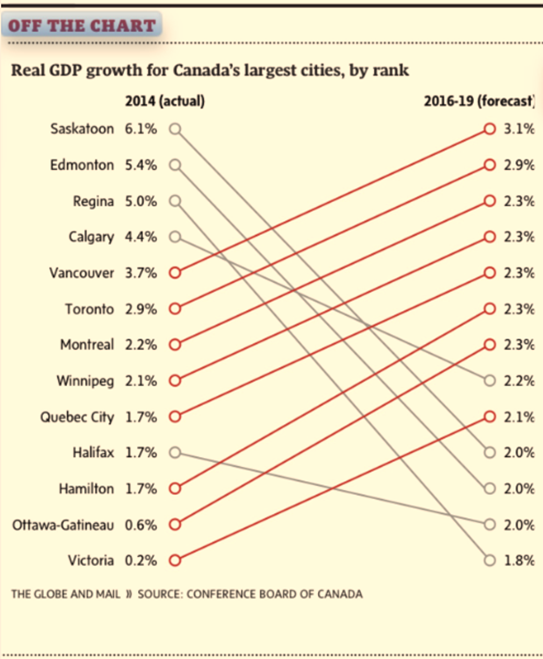
Globe’s recent depiction of metropolitan economic growth in the series Off the Charts was way off the mark. The chart plotted the current and forecasted GDP growth rates for select cities in Canada. The red-coloured upward sloping lines depicted cities with increasing economic growth rates and the grey-colored downward sloping lines highlighted those with slowing economic growth.

There is, however, a small problem. The chart erroneously showed some slowing economies as growing and vice versa. Furthermore, the trajectory of the sloping lines would mislead the readers to assume that cities with parallel lines enjoyed a similar increase in the growth rate, which, of course, is not true. The graphical faux pas was certainly avoidable had a bar chart were used.
Source: The Globe and Mail, Page B6, May 15.

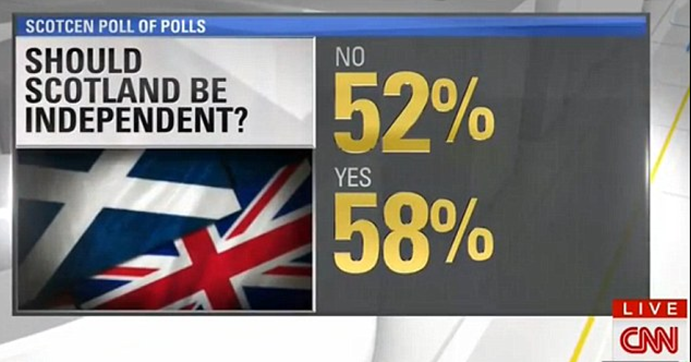
Of course, the Globe and Mail is not alone in coming up with math that simply doesn’t add up. While covering the Scottish independence vote in September 2014, CNN reported that Scots voted a 110% in the referendum such that 58% voted yes and another 52% voted no.
Source: Mail Online. September 19, 2014

The recent rise of data journalism has witnessed the emergence of data visualization where the editors increasingly reinforce narrative with creative info-graphics. While major news outlets such as The Economist, The New York Times, and the Wall Street Journal retained experts in data science and visualization, most newspapers have entrusted the task to the graphics departments that rely on tools that are not specifically designed for data visualization. At times, the outcome is math- and logic-defying graphics that present a false picture.

Even when charts correctly depict data, at times the visualizations are too complex for the ordinary newsreader to grasp. Powerful data visualizations tools, such as D3 (a JavaScript library) are often abused to create graphics too rich in detail to comprehend. The use of Hierarchical Edge Bundling, for instance, is becoming increasingly popular in the news media resulting in complex graphics that are visually impressive, but conceptually confusing.

Edward Tufte and Leland Wilkinson have spent a lifetime advising data enthusiasts on how to present data-driven information. Wilkinson is the author of The Grammar of Graphics, which sets out the fundamentals for presenting data. Wilkinson’s writings inspired Hadley Wickham to develop ggplot2, a graphing engine for R, which is increasingly becoming the tool of choice for data scientists. 

Tufte inspired Dona M. Wong, who was the graphics director at the Wall Street Journal. Ms. Wong authored The Wall Street Journal Guide to Information Graphics. Her book is a quintessential guide for those who work with data and would like to present information as charts. She uses examples from the Journal to illustrate the dos and don’ts of presenting data as info-graphics.

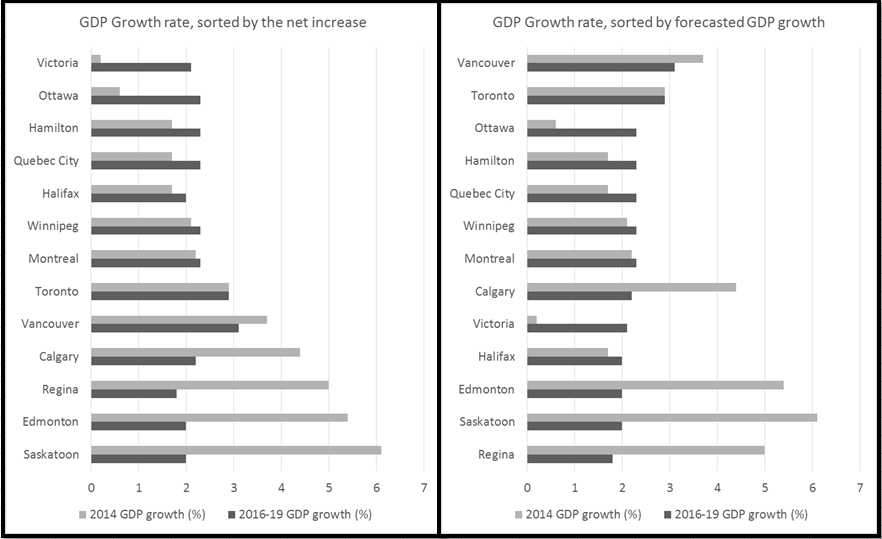
Let us return to the forecasted metropolitan growth rates in Canada. I prefer the horizontal bar chart instead. The bar chart offers me several options to highlight the main argument in the story. If I were interested in highlighting cities with the highest gains in growth since 2014, I would sort the cities accordingly, as is illustrated in the graphic on the left (see below). If I were interested in highlighting cities with the highest forecasted growth rate, I would sort them accordingly to result in the graphic on the right.

Dana Wong insists on simplicity in rendering. She concludes her book with a simple message for data visualization: simplify, simplify, simplify. The two bar charts simplify the same information presented by the Globe. The results are obvious: I avoid misrepresenting data. One can readily see Halifax’s economy is forecasted to grow and Vancouver’s to shrink. The Globe’s rendering depicted exactly the opposite.


Sunday, December 8, 2013

Summarize statistics by Groups in R & R Commander

R is great at accomplishing complex tasks. Doing simple things with R though takes some effort. Consider the simple task of producing summary statistics for continuous variables over some factor variables. Using Stata, I’d write a brief one-liner to get the mean for one or more variables using another variable as a factor. For instance, tabstat Horsepower RPM, by(Type)  in Stata produces the following:

image

The doBy package in R offers similar functionality and more. Of particular interest for those who teach R based statistics courses in the undergraduate programs is the doBy plugin for R Commander. The plugin was developed by Jonathan Lee and it is a great tool for teaching and for quick data analysis. To get the same output as the one listed above, I’d click on the doBy plugin to get the following dialogue box:

image

The dialogue box results in the following simple syntax:

summaryBy(Horsepower+RPM~Type, data=Cars93, FUN=c(mean))

You may first have to load the data set:
data(Cars93, package="MASS")

And the results are presented below:

image

Jonathan has also created GUIs for order by, sample by, and split by within the same plug-in. A must use plug-in for data scientists.

Comparing mnlogit and mlogit for discrete choice models

Earlier this weekend (Dec. 7, 2013), mnlogit was released on CRAN by Wang Zhiyu and Asad Hasan (asad.hasan@sentrana.com) claiming that mnlogit uses “parallel C++ library to achieve fast computation of Hessian matrices”.

Here is a comparison of mnlogit with mlogit by Yves Croissant whose package seems to be the inspiration for mnlogit.

I will estimate the same model using the same data set and will compare the two packages for execution speed, specification flexibility, and ease of use.

Data set

I use the Fish data set to estimate mnlogit and mlogit. mnlogit defines the data set as follows:

A data frame containing :

  • mode - The choice set: beach, pier, boat, and charter
  • price - price for a mode for an individual
  • catch - fish catch rate for a mode for an individual
  • income - monthly income of the individual decision-maker
  • chid - decision maker ID

The authors mention that they have sourced the data from R package mlogit by Yves Croissant, which lists the source as:

  • Herriges, J. A. and C. L. Kling (1999) “Nonlinear Income Effects in Random Utility Models”, Review of Economics and Statistics, 81, 62-72.

Estimation with mnlogit

library(mnlogit)


## Warning: package 'mnlogit' was built under R version 3.0.2


## Package: mnlogit Version: 1.0 Multinomial Logit Choice Models. Scientific
## Computing Group, Sentrana Inc, 2013.


data(Fish, package = "mnlogit")
fm <- formula(mode ~ 1 | income | price + catch)
summary(mnlogit(fm, Fish, "alt"))


## 
## Call:
## mnlogit(formula = fm, data = Fish, choiceVar = "alt")
##
## Frequencies of alternatives in input data:
## beach boat charter pier
## 0.113 0.354 0.382 0.151
##
## Number of observations in training data = 1182
## Number of alternatives = 4
## Intercept turned: ON.
## Number of parameters in model = 14
## # individual specific variables = 2
## # choice specific coeff variables = 2
## # generic coeff variables = 0
##
## Maximum likelihood estimation using Newton-Raphson iterations.
## Number of iterations: 7
## Number of linesearch iterations: 7
## At termination:
## Gradient 2-norm = 8.19688645245397e-05
## Diff between last 2 loglik values = 4.15543581766542e-08
## Stopping reason: Succesive loglik difference < ftol (1e-06).
## Total estimation time (sec): 0.04
## Time for Hessian calculations (sec): 0.04 using 1 processors.
##
## Coefficients :
## Estimate Std.Error t-value Pr(>|t|)
## (Intercept):boat 8.64e-01 3.15e-01 2.74 0.00607 **
## (Intercept):charter 1.85e+00 3.10e-01 5.97 2.4e-09 ***
## (Intercept):pier 1.13e+00 3.05e-01 3.71 0.00021 ***
## income:boat -1.10e-04 6.02e-05 -1.84 0.06636 .
## income:charter -2.78e-04 6.03e-05 -4.61 4.0e-06 ***
## income:pier -1.28e-04 5.33e-05 -2.41 0.01605 *
## price:beach -3.80e-02 3.33e-03 -11.41 < 2e-16 ***
## price:boat -2.09e-02 2.23e-03 -9.33 < 2e-16 ***
## price:charter -1.60e-02 2.02e-03 -7.94 2.0e-15 ***
## price:pier -3.92e-02 3.26e-03 -12.02 < 2e-16 ***
## catch:beach 4.95e+00 8.20e-01 6.04 1.5e-09 ***
## catch:boat 2.47e+00 5.19e-01 4.76 1.9e-06 ***
## catch:charter 7.61e-01 1.52e-01 4.99 6.0e-07 ***
## catch:pier 4.88e+00 8.99e-01 5.43 5.5e-08 ***
## ---
## Signif. codes: 0 '***' 0.001 '**' 0.01 '*' 0.05 '.' 0.1 ' ' 1
##
## Log-Likelihood: -1160, df = 14
## AIC: 13.8875709217033


system.time((mnlogit(fm, Fish, "alt")))


##    user  system elapsed 
## 0.11 0.00 0.11


Estimation with mlogit


I estimate the same model using mlogit.


library(mlogit)


## Loading required package: Formula Loading required package: statmod
## Loading required package: lmtest Loading required package: zoo
##
## Attaching package: 'zoo'
##
## The following object is masked from 'package:base':
##
## as.Date, as.Date.numeric
##
## Loading required package: maxLik Loading required package: miscTools
## Loading required package: MASS


data2 <- mlogit.data(Fish, choice = "alt", shape = "long", id.var = "chid"
,
alt.levels
= c("beach", "boat", "charter", "pier"))
summary(mod1 <- mlogit(mode ~ 1 | income | price + catch, data2, reflevel = "beach"))


## 
## Call:
## mlogit(formula = mode ~ 1 | income | price + catch, data = data2,
## reflevel = "beach", method = "nr", print.level = 0)
##
## Frequencies of alternatives:
## beach boat charter pier
## 0.113 0.354 0.382 0.151
##
## nr method
## 7 iterations, 0h:0m:0s
## g'(-H)^-1g = 8.31E-08
## gradient close to zero
##
## Coefficients :
## Estimate Std. Error t-value Pr(>|t|)
## boat:(intercept) 8.64e-01 3.15e-01 2.74 0.00607 **
## charter:(intercept) 1.85e+00 3.10e-01 5.97 2.4e-09 ***
## pier:(intercept) 1.13e+00 3.05e-01 3.71 0.00021 ***
## boat:income -1.10e-04 6.02e-05 -1.84 0.06636 .
## charter:income -2.78e-04 6.03e-05 -4.61 4.0e-06 ***
## pier:income -1.28e-04 5.33e-05 -2.41 0.01605 *
## beach:price -3.80e-02 3.33e-03 -11.41 < 2e-16 ***
## boat:price -2.09e-02 2.23e-03 -9.33 < 2e-16 ***
## charter:price -1.60e-02 2.02e-03 -7.94 2.0e-15 ***
## pier:price -3.92e-02 3.26e-03 -12.02 < 2e-16 ***
## beach:catch 4.95e+00 8.20e-01 6.04 1.5e-09 ***
## boat:catch 2.47e+00 5.19e-01 4.76 1.9e-06 ***
## charter:catch 7.61e-01 1.52e-01 4.99 6.0e-07 ***
## pier:catch 4.88e+00 8.99e-01 5.43 5.5e-08 ***
## ---
## Signif. codes: 0 '***' 0.001 '**' 0.01 '*' 0.05 '.' 0.1 ' ' 1
##
## Log-Likelihood: -1160
## McFadden R^2: 0.225
## Likelihood ratio test : chisq = 675 (p.value = <2e-16)


system.time(mlogit(mode ~ 1 | income | price + catch, data2, reflevel = "beach"))


##    user  system elapsed 
## 0.27 0.02 0.28


Speed Tests


I conducted a simple test for execution times with the command system.time. The results are reported above after each model summary.


Findings


  • I obtain identical results for the models estimated with mnlogit and mlogit.


  • Estimation speeds appear faster for mnlogit.


  • caveat: The same command (system.time) when run independently of the R Markdown environment shows mlogit to be faster than mnlogit!


  • Additional Comments: I restarted RStudio and estimated the two models again outside of R Markdown. mnlogit took  0.12 seconds versus 0.31 seconds for mlogit.


  • Verdict: mnlogit reports shorter execution times than mlogit.


  • Also, Estimation speeds may differ with large and complex data sets.


  • The model specification is simpler in mnlogit.


  • The commands for specifying the data set and the model seem easier in mnlogit.


  • mlogit syntax seems relatively complex, but offers more choices in model specification.

    Final comment


    I am delighted to see yet another package for discrete choice models. As the field evolves and more advanced problems are subjected to discrete choice models, the need for robust and computationally efficient packages will be felt more. Both mlogit and mnlogit are indeed valuable to those interested in how humans make good and bad choices!